Scenario
Scenario Overview
Scenario helps developers:
- Visualize and effectively communicate API behavior.
- Understand technical details and data flow processes without reading source code directly.
- Easily identify incomplete parts, structural issues, or redundant elements, reducing errors and optimizing design before implementation.
Developers can configure API business logic based on different scenarios.
Scenario Components
- Start: The starting point of the API request processing flow.
- Select query database: Contains SQL Select queries and the returned data fields.
- Update Database: Contains SQL Update, Insert, Delete queries.
- Api: Defines an API call configuration, including the API path, parameters, headers, body, and result variables.
- Decision: A condition that determines whether to continue or stop the current processing flow.
- Transform Json: Maps input variables into a JSON object.
- Tcp Socket: Sends messages through a TCP/IP port.
- JMS Send Message: Sends messages using the Java Message Service (JMS), which allows Java applications to communicate asynchronously.
- Message template: Defines the structure of system-generated messages.
- End: The endpoint of the request processing flow.
Quick Guide
Add an Element to a Scenario
You can add an element to a scenario by dragging the desired element from the list at the bottom of the screen and dropping it into the scenario.
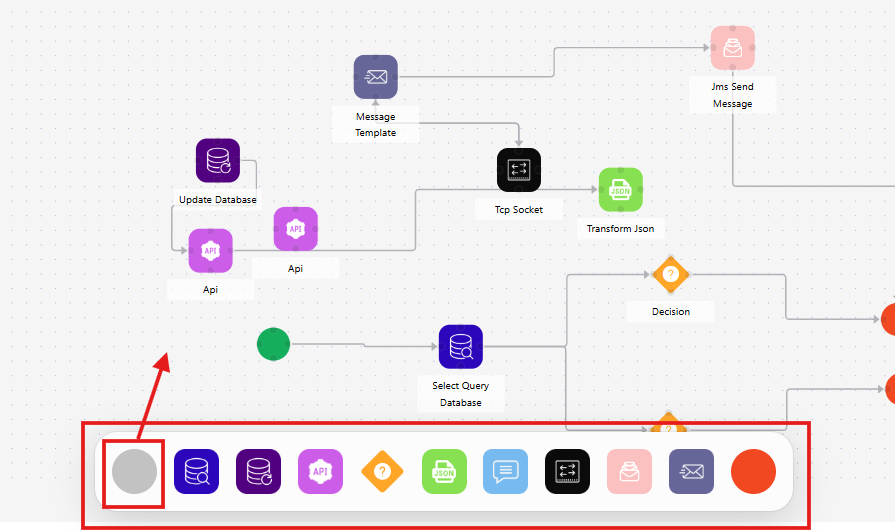
Create Links Between Elements
When you hover over an element in the scenario, four circular nodes will appear around it. You can create a connection by clicking and dragging from one node to another. The arrow direction follows the drag sequence.
Build a Logical Flow in a Scenario
A logical flow starts from the Start element, passes through intermediate processing points, and ends at the End element. Follow these steps to create a scenario:
Step 1: Add the Start and End elements to the scenario.
Step 2: Add intermediate processing elements or Decision elements to determine flow branching.
Step 3: Create links between elements.
Refer to the guides below for detailed instructions: